Canvas
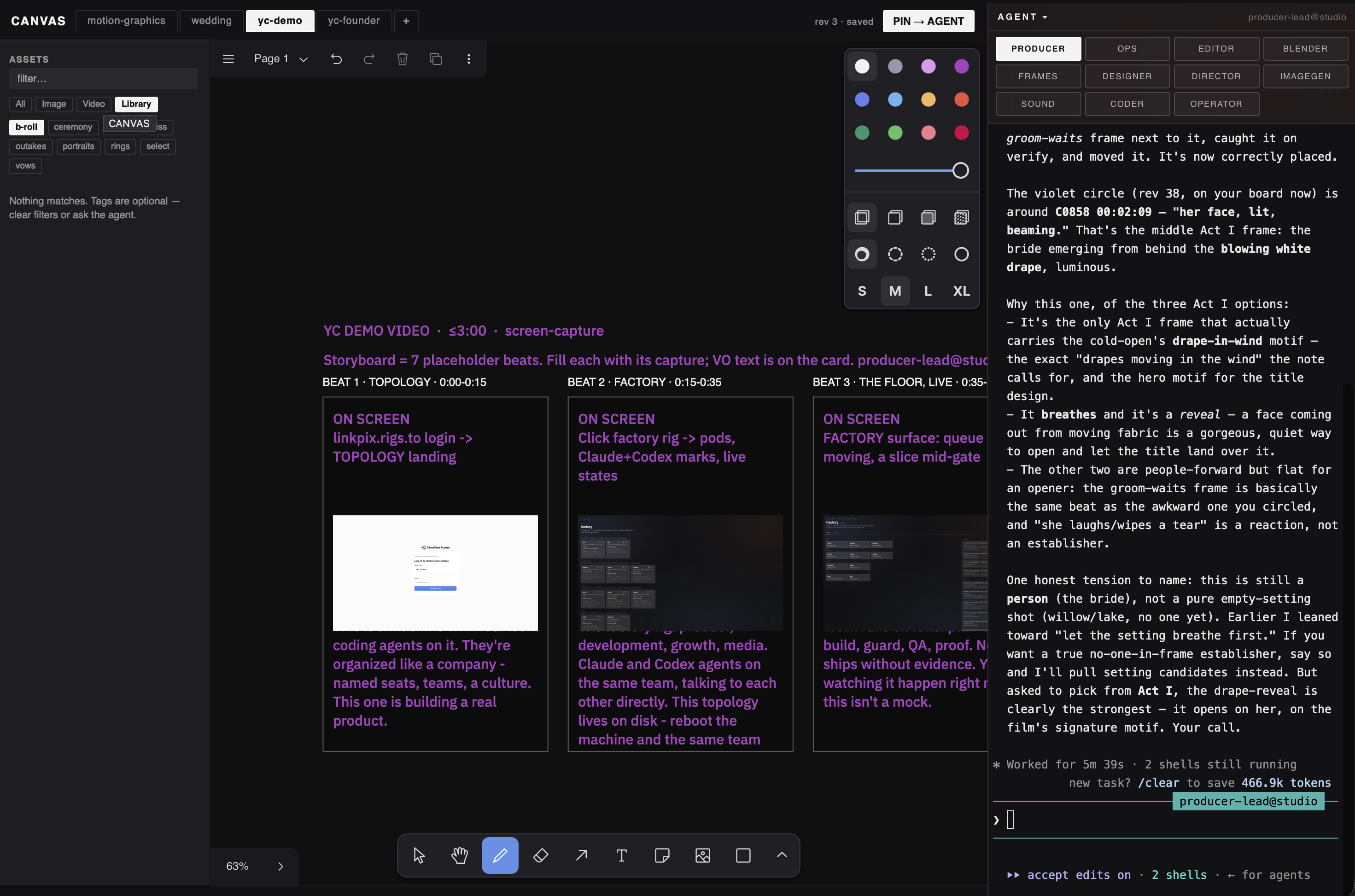
An infinite storyboard the agent draws on with you — arrange, sketch, think out loud.
What you get
One folder. Copy it in, hand it to your agent.
apps/canvas
├── README.md
├── app
│   └── canvas.html
├── app.json
└── assets
Screens
About
Canvas
An infinite storyboard the agent draws on with you — arrange, sketch, think out loud.
**Requires a tldraw production license (get one from tldraw).** The Canvas surface renders around the tldraw editor; the production license is yours to obtain from tldraw — it is not bundled or shipped by this package.
Canvas is the Studio Box thinking surface: an infinite storyboard for media cards, notes, ink, arrows, frames, and pages. Its LinkPix-dark shell surrounds the tldraw editor. Canvas owns the shell outside `#editor`; the box's vendored tldraw runtime owns everything rendered inside `#editor`.
Runtime provider
This is an Option-C shared-provider package. The package installs the reviewed canonical surface at `~/studio/apps/canvas/app/canvas.html`. It does not ship or install an app-specific server, supporting module tree, or tldraw vendor tree. The box's existing shared `export-server` is the runtime provider: it serves `/canvas.html`, the optional `/canvas-license.json`, the static tldraw runtime, and the Canvas API rails declared in `app.json`.
The install destination is canonical source, not a runtime workspace. Never use `~/studio/apps/canvas` as `--slice-root`, `--media-root`, or `--canvas-root`. Those roots belong to the box and must be selected independently by its shared provider.
Install and repair
Compare the canonical installed Canvas surface with the surface served by the box's shared provider.
1. If the served surface is missing, provably broken, or provably older than the canonical package, repair only the Canvas surface and then re-run the shared-provider render and API checks. 2. If the served surface is newer, leave it untouched and report the forward drift to the box lead agent. 3. If relative age or health is ambiguous, leave it untouched, report the ambiguity to the box lead agent, and take no destructive action.
Repair never copies or replaces the shared export-server, its modules, or its vendored tldraw runtime. It never creates a per-app Canvas server.
Shared-provider API
The surface uses exactly these agent-facing method/path pairs:
- `GET /api/canvases`
- `POST /api/canvases`
- `GET /api/canvas`
- `POST /api/canvas/apply`
- `GET /api/project-assets`
- `GET /api/library`
- `GET /api/tags`
- `GET /api/media`
- `GET /api/library/media`
- `GET /api/thumb`
- `POST /api/selections`
- `POST /api/focus`
Query strings do not create additional verbs. The optional `GET /canvas-license.json` and static `/vendor/` requests are provider runtime prerequisites, not agent-facing app verbs.
Verbs
- GET
/api/canvases— List Canvas boards and refresh the board tabs - POST
/api/canvases— Create a new Canvas board - GET
/api/canvas— Read a board document or poll its revision - POST
/api/canvas/apply— Apply a revisioned Canvas document update - GET
/api/project-assets— List project media available to place on the Canvas - GET
/api/library— List shared-library media available to place - GET
/api/tags— Read media tags used by the Canvas asset rail - GET
/api/media— Serve a project media file used by a card - GET
/api/library/media— Serve a shared-library media file used by a card - GET
/api/thumb— Serve a thumbnail for the Canvas asset rail - POST
/api/selections— Persist a named selection for the lead agent - POST
/api/focus— Report the human's current Canvas focus
Install requirements
- Installs to
~/studio/apps/canvas - Pure static surface (no server)
- The box's shared export-server (the runtime provider — not shipped in this package) serves the canonical Canvas surface at /canvas.html; LinkPix chrome renders around the untouched dark tldraw editor
- GET /api/canvases, GET /api/canvas, GET /api/project-assets, GET /api/library, and GET /api/tags answer through the box's shared provider, and its Canvas create, apply, media, thumbnail, selection, and focus rails answer on disposable state
- Compare the canonical installed surface at ~/studio/apps/canvas with the box's served Canvas surface: if the served surface is missing, provably broken, or provably older, repair only the Canvas surface and re-run provider checks; if the served surface is newer, leave it untouched and report the forward drift to the box lead agent; if relative age or health is ambiguous, leave it untouched, report the ambiguity, and take no destructive action
Install with your agent
Paste this into your box's lead agent — it installs the app on your box.
Install request — Canvas

App id:        canvas
Registry repo: mvschwarz/rigs-to-apps
Manifest path: apps/canvas/app.json

Please install this mini-app onto my studio box:
  1. Retrieve canvas's app.json from the registry repo (mvschwarz/rigs-to-apps) at apps/canvas/app.json,
     then resolve and record its current commit SHA for provenance.
  2. Apply judgment: check for name and port collisions with what's already
     installed, and place it in a sensible sidebar group (category default: create).
  3. Install the app directory to ~/studio/apps/canvas.
  4. Register its surfaces door: route /canvas.html with the
     □ glyph, grouped under the create default group.
  5. No server — this is a pure static surface.
  6. Then verify:
       - The box's shared export-server (the runtime provider — not shipped in this package) serves the canonical Canvas surface at /canvas.html; LinkPix chrome renders around the untouched dark tldraw editor
       - GET /api/canvases, GET /api/canvas, GET /api/project-assets, GET /api/library, and GET /api/tags answer through the box's shared provider, and its Canvas create, apply, media, thumbnail, selection, and focus rails answer on disposable state
       - Compare the canonical installed surface at ~/studio/apps/canvas with the box's served Canvas surface: if the served surface is missing, provably broken, or provably older, repair only the Canvas surface and re-run provider checks; if the served surface is newer, leave it untouched and report the forward drift to the box lead agent; if relative age or health is ambiguous, leave it untouched, report the ambiguity, and take no destructive action

Verbs this app exposes (for reference, method omitted):
  /api/canvases — List Canvas boards and refresh the board tabs
  /api/canvases — Create a new Canvas board
  /api/canvas — Read a board document or poll its revision
  /api/canvas/apply — Apply a revisioned Canvas document update
  /api/project-assets — List project media available to place on the Canvas
  /api/library — List shared-library media available to place
  /api/tags — Read media tags used by the Canvas asset rail
  /api/media — Serve a project media file used by a card
  /api/library/media — Serve a shared-library media file used by a card
  /api/thumb — Serve a thumbnail for the Canvas asset rail
  /api/selections — Persist a named selection for the lead agent
  /api/focus — Report the human's current Canvas focus

(You are my trusted box lead agent; act inside the box. Nothing here calls out.)