Cutdown
Turn hours of footage into the best minutes — agent-cut.
What you get
One folder. Copy it in, hand it to your agent.
apps/cutdown
├── README.md
├── app
│   ├── cutdown-server.mjs
│   └── cutdown.html
├── app.json
└── assets
Screens
About
Cutdown
Turn hours of footage into the best minutes — agent-cut.
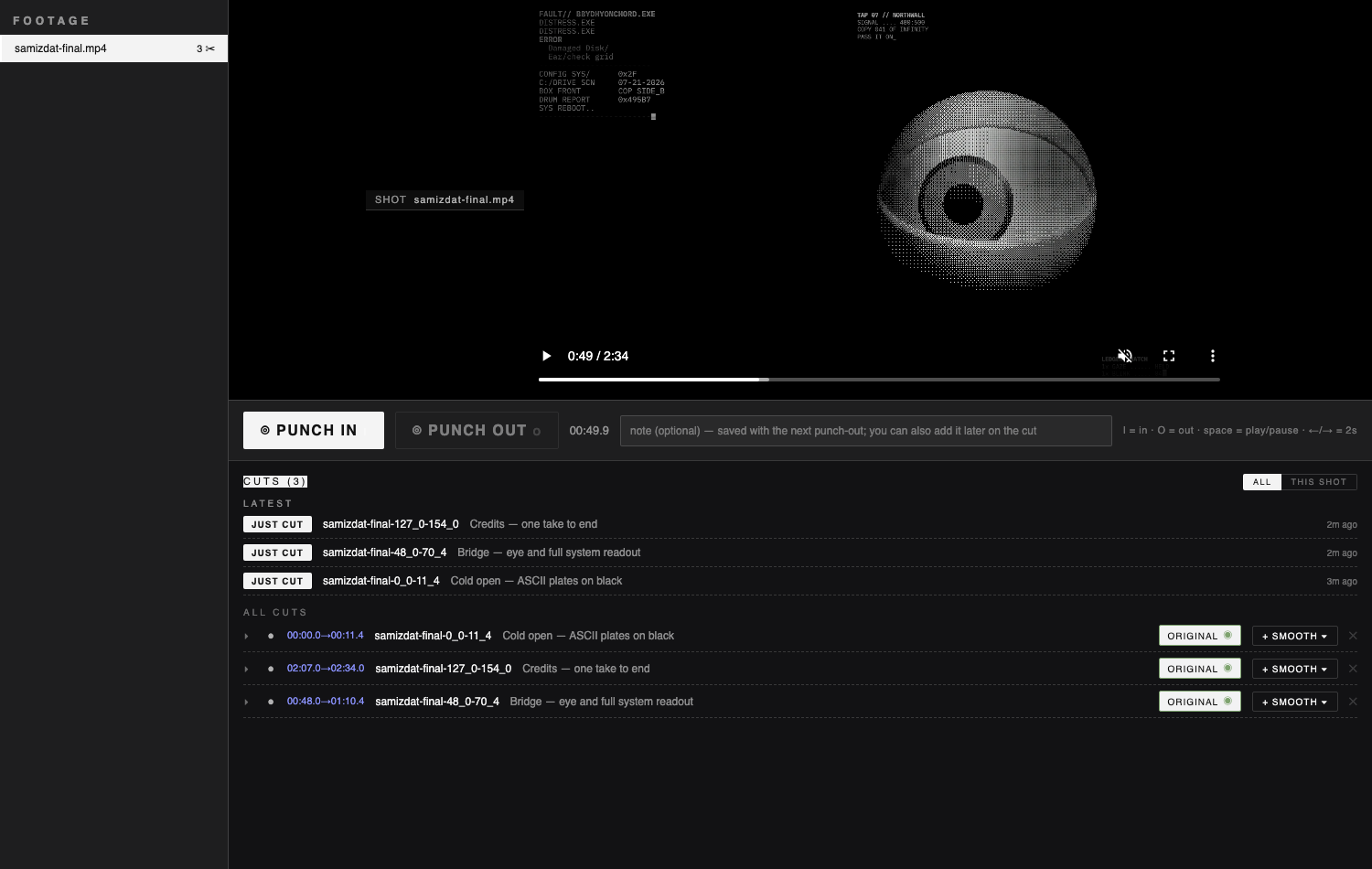
Point Cutdown at a pile of raw footage — a vacation, a birthday, a wedding, a shoot. Watch the proxies in your browser, punch in on the moments worth keeping, and your studio rig cuts them for you. Every cut lives on disk with its versions side by side — lock the one the video should use. Your original footage is never touched.
Built the hard way: a full wedding film was its proving run. It works on anything where the best two minutes are buried in hours.
Cutdown reviews and records; the cutting itself runs on your studio box.
What this package contains
- `app/cutdown.html` — the single-file review surface (LinkPix-dark).
- `app/cutdown-server.mjs` — the surface's backend: serves proxies with range
support, lists clips/cuts, and persists attributed markers (JSONL, durable-first). It reads its footage/bundle roots from `--footage` / `--bundle` arguments.
Studio Box prerequisite (not shipped here)
Cutdown reviews footage and records punches; **the actual cutting and smoothing happen in an external toolchain that the Studio Box provides** — the marker-watcher, the deterministic cut lane, and the ffmpeg-based smoothing. This package does **not** ship that worker: a cut is written by the box's cutting lane once a marker lands, not by this surface. Install Cutdown on a Studio Box that runs that lane.
Verbs (surface backend)
Read: `GET /api/clips`, `GET /api/markers`, `GET /api/cuts`. Write: `POST /api/markers` (punch / delete), `POST /api/stabilize` (queue a smoothing level), `POST /api/pick` (lock a version), `POST /api/cut-note`, `POST /api/cut-retry`, `POST /api/cut-delete`. Static media is served under `/media/`, `/cutprev/`, `/cuts/`, and `/master/`.
Verbs
- GET
/api/clips— List clips (proxy files) with marker counts - GET
/api/markers— List punch markers - POST
/api/markers— Append a punch marker (or a deletion record) - GET
/api/cuts— List cuts, their versions, and cutting/failed state - POST
/api/stabilize— Queue a smoothing pass at a level - POST
/api/pick— Lock which version a cut uses - POST
/api/cut-note— Edit or add a cut's note - POST
/api/cut-retry— Retry a failed cut - POST
/api/cut-delete— Archive a cut (restorable)
Install requirements
- Installs to
~/studio/apps/cutdown - Runs a server:
node app/cutdown-server.mjs --port $PORT - Open the surface entry and confirm it renders
- The server boots and serves the page
- GET /api/clips returns a list of clips
- GET /api/markers returns the marker list
- GET /api/cuts returns cuts, cutting, and failed
Install with your agent
Paste this into your box's lead agent — it installs the app on your box.
Install request — Cutdown

App id:        cutdown
Registry repo: mvschwarz/rigs-to-apps
Manifest path: apps/cutdown/app.json

Please install this mini-app onto my studio box:
  1. Retrieve cutdown's app.json from the registry repo (mvschwarz/rigs-to-apps) at apps/cutdown/app.json,
     then resolve and record its current commit SHA for provenance.
  2. Apply judgment: check for name and port collisions with what's already
     installed, and place it in a sensible sidebar group (category default: create).
  3. Install the app directory to ~/studio/apps/cutdown.
  4. Register its surfaces door: route /cutdown.html with the
     ✂ glyph, grouped under the create default group.
  5. Start its server per install.server (bind the preferred port unless taken).
  6. Then verify:
       - Open the surface entry and confirm it renders
       - The server boots and serves the page
       - GET /api/clips returns a list of clips
       - GET /api/markers returns the marker list
       - GET /api/cuts returns cuts, cutting, and failed

Verbs this app exposes (for reference, method omitted):
  /api/clips — List clips (proxy files) with marker counts
  /api/markers — List punch markers
  /api/markers — Append a punch marker (or a deletion record)
  /api/cuts — List cuts, their versions, and cutting/failed state
  /api/stabilize — Queue a smoothing pass at a level
  /api/pick — Lock which version a cut uses
  /api/cut-note — Edit or add a cut's note
  /api/cut-retry — Retry a failed cut
  /api/cut-delete — Archive a cut (restorable)

(You are my trusted box lead agent; act inside the box. Nothing here calls out.)