Kanban Factory
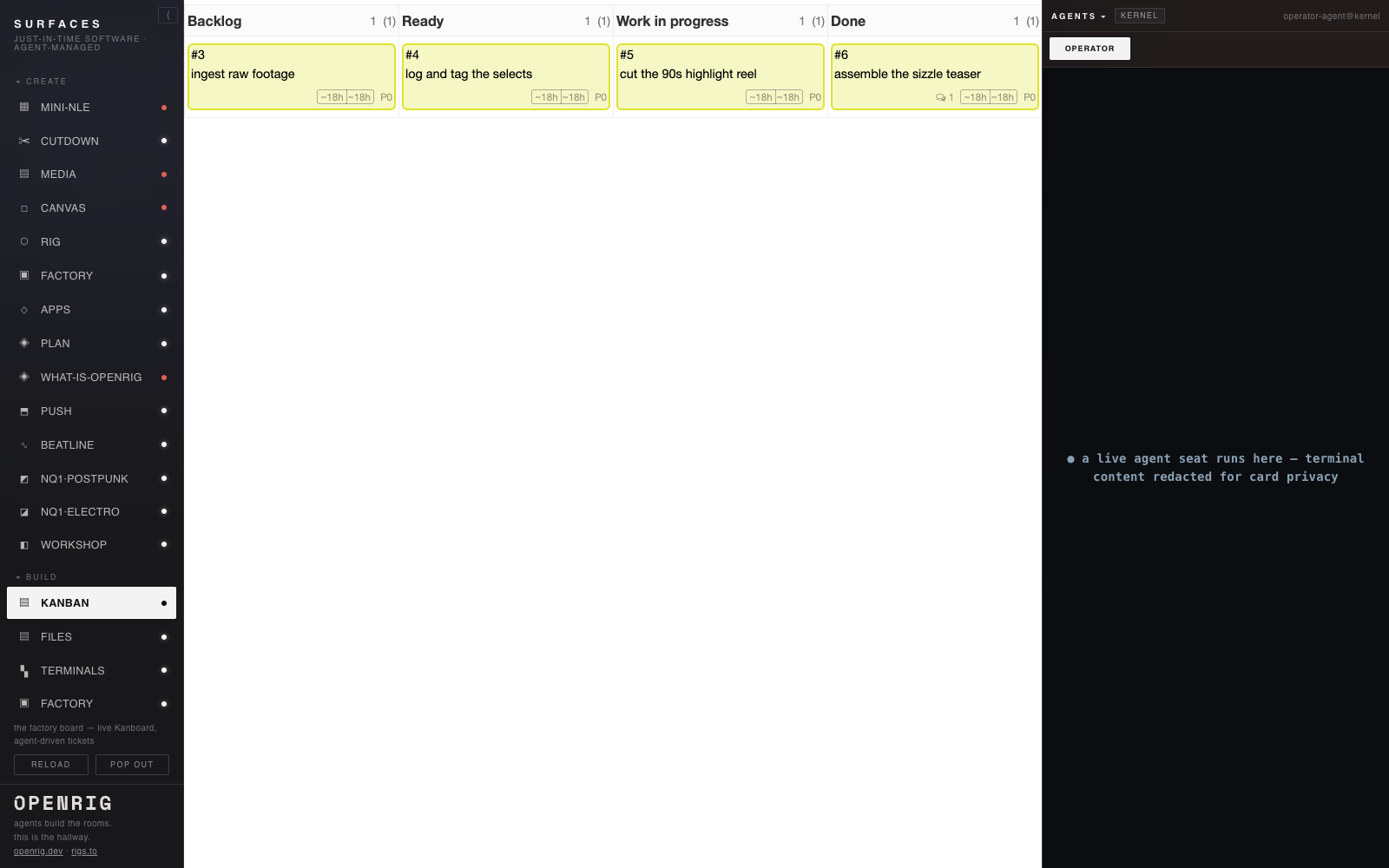
The ticket board your agents actually run — pick up the card, move it across the columns, do the work, close it.
What you get
One folder. Copy it in, hand it to your agent.
apps/kanban-factory
├── README.md
├── RUNBOOK.md
├── agents
│   ├── board-driver
│   └── orchestrator
├── app.json
├── assets
├── docker-compose.yaml
├── glue
│   ├── kb.sh
│   └── read-token.php
├── kanban.html
└── rig.yaml
Screens
About
Kanban Factory
The ticket board your agents actually run — pick up the card, move it across the columns, do the work, close it.
A real Kanban board — open-source Kanboard (MIT) — running in one small container on your box, with the agent seats that drive it. Instead of you dragging cards, an agent pulls a ticket, moves it across Backlog, Ready, In progress, and Done, records the work on the card, and closes it — all through the board's own API, terminal-in / terminal-out as the interface. The board's own UI is the surface; you just watch the work move.
The human-shaped software factory, composed in an afternoon — an existing tool your agents operate, not a bespoke app.
What you get
One folder: a rigspec that boots the containerized board and launches the seats, plus a ~20-line JSON-RPC glue wrapper. Copy it in, hand it to your agent.
The live surface
Kanboard's own authenticated UI is the real surface. Boot the rig, then open Kanboard's own UI at its local board URL (by default http://127.0.0.1:8791) and sign in there. The included kanban.html is only a launcher/explainer — it is not the board and holds no credentials.
The lifecycle (two distinct terminal states)
An agent drives one ticket end to end, entirely over JSON-RPC — never the browser:
1. create the ticket 2. pick it up — the driving agent records an explicit pickup on the ticket 3. move it across the columns (resolved dynamically), ending in Done 4. record one bounded work step on the ticket 5. work complete — the card lands visibly, open, in the Done column 6. terminal closure — closeTask, after it is in Done
Work complete and terminal closure are recorded distinctly; a greyed closed card alone is not "work done".
Package contents
- rig.yaml — the docker'd board as a managed service plus two seats (orchestrator, board-driver)
- docker-compose.yaml — one Kanboard container, SQLite, loopback-only, digest-pinned
- glue/kb.sh — the ~20-line JSON-RPC wrapper (dynamic IDs; token from a 0600 env-file, never printed)
- agents/ — the orchestrator and board-driver seat guidance
- RUNBOOK.md — boot, token bootstrap, drive, teardown
Agent-facing verbs (JSON-RPC over one POST endpoint /jsonrpc.php)
- createTask — file a ticket
- getColumns — resolve the board columns dynamically
- moveTaskPosition — move a card into a named column
- createComment — record pickup and the work step on the ticket
- getTask — read a card's column and open/closed state
- closeTask — terminal closure after Done
License
Kanboard is open-source (MIT) — no license caveat. This package runs it in one container on your box and drives it with agent seats.
Verbs
- POST
/jsonrpc.php— createTask — file a ticket on the board - POST
/jsonrpc.php— getColumns — resolve the board columns dynamically - POST
/jsonrpc.php— moveTaskPosition — move a card into a named column - POST
/jsonrpc.php— createComment — record pickup and the work step on the ticket - POST
/jsonrpc.php— getTask — read a card's column and open/closed state - POST
/jsonrpc.php— closeTask — terminal closure after the card is in Done
Install requirements
- Installs to
~/studio/apps/kanban-factory - Pure static surface (no server)
- docker compose boots the single Kanboard container (SQLite, loopback-only, digest-pinned) and it answers on its local board URL
- An agent files a ticket, records an explicit pickup on it, and moves it across the dynamically-resolved columns into the Done column
- The card lands visibly OPEN in Done (work complete), then closeTask closes it (terminal) — both states recorded distinctly, over JSON-RPC and never the browser UI
Install with your agent
Paste this into your box's lead agent — it installs the app on your box.
Install request — Kanban Factory

App id:        kanban-factory
Registry repo: mvschwarz/rigs-to-apps
Manifest path: apps/kanban-factory/app.json

Please install this mini-app onto my studio box:
  1. Retrieve kanban-factory's app.json from the registry repo (mvschwarz/rigs-to-apps) at apps/kanban-factory/app.json,
     then resolve and record its current commit SHA for provenance.
  2. Apply judgment: check for name and port collisions with what's already
     installed, and place it in a sensible sidebar group (category default: build).
  3. Install the app directory to ~/studio/apps/kanban-factory.
  4. Register its surfaces door: route /kanban.html with the
     ▤ glyph, grouped under the build default group.
  5. No server — this is a pure static surface.
  6. Then verify:
       - docker compose boots the single Kanboard container (SQLite, loopback-only, digest-pinned) and it answers on its local board URL
       - An agent files a ticket, records an explicit pickup on it, and moves it across the dynamically-resolved columns into the Done column
       - The card lands visibly OPEN in Done (work complete), then closeTask closes it (terminal) — both states recorded distinctly, over JSON-RPC and never the browser UI

Verbs this app exposes (for reference, method omitted):
  /jsonrpc.php — createTask — file a ticket on the board
  /jsonrpc.php — getColumns — resolve the board columns dynamically
  /jsonrpc.php — moveTaskPosition — move a card into a named column
  /jsonrpc.php — createComment — record pickup and the work step on the ticket
  /jsonrpc.php — getTask — read a card's column and open/closed state
  /jsonrpc.php — closeTask — terminal closure after the card is in Done

(You are my trusted box lead agent; act inside the box. Nothing here calls out.)