PUSH
A playable virtual Push that drives a real Ableton rig through an agent — 272 pads of your own library, tap a combo, lock the scene.
What you get
One folder. Copy it in, hand it to your agent.
apps/push
├── README.md
├── app
│   └── push.html
├── app.json
└── assets
Screens
About
PUSH
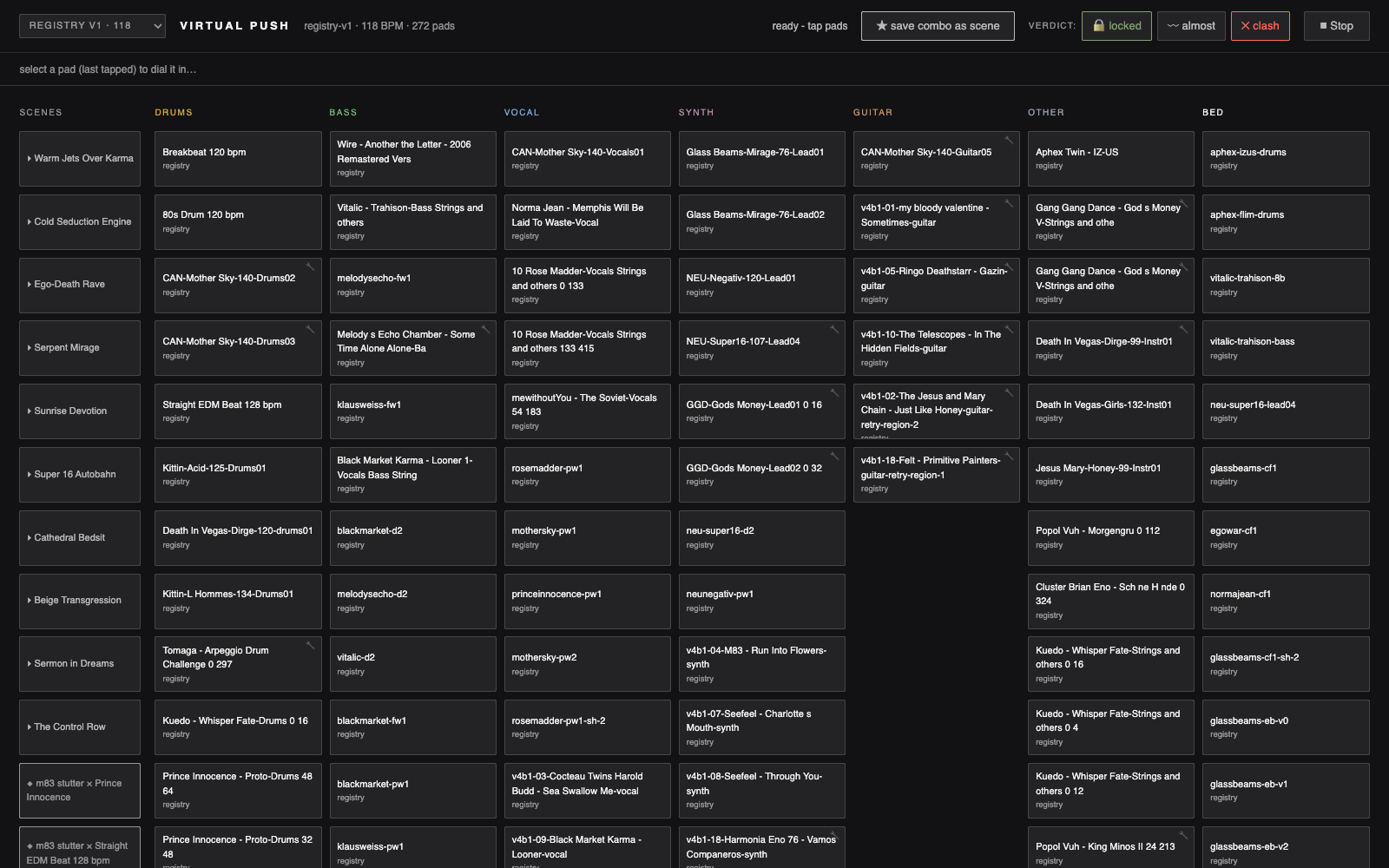
A hardware-Push-style pad grid in your browser, wired to a real Ableton Live set through an agent. Every pad is a clip from your own library — drums, bass, vocal, synth, guitar, beds — laid out the way you actually build. Tap pads to dial a combo; the verdict bar tells you if it locks, almosts, or clashes. Save it as a scene and the agent drives Ableton to match. The instrument you'd design if you knew exactly how you work — because you did.
What you get
One folder — the pad-grid surface plus the rigspec that wires it to your Ableton set through the agent. Bring your library; it maps to the pads.
Prerequisite (your own machine)
The pad grid drives a REAL Ableton Live session on your own machine through the agent. That Ableton backend is an external prerequisite — it is not shipped in this package. The surface reviews, dials, and anchors scenes; the sound is your Live set.
Install (drift-aware, no destructive action)
Compare the canonical installed source at ~/studio/apps/push against the box's served surface, and repair (copy the canonical source in) only if the box surface is missing, provably broken, or provably older. If the box surface is newer (forward drift), leave it untouched and report. If age or health is ambiguous, leave it untouched and report to the box lead agent.
Verbs
- GET
/api/project— Load the pad-grid project — pads, scenes, and the role layout - GET
/api/palettes— List the available palettes (your libraries) - GET
/api/kitmeta— Read the kit metadata — the pad-to-clip mapping - GET
/api/clipwav— Fetch a pad's clip waveform for preview - POST
/api/save— Save a tapped combo as a named scene - POST
/api/anchor— Anchor a scene to the live Ableton set through the agent - POST
/api/reanchor— Re-anchor — update a scene's mapping to the live set
Install requirements
- Installs to
~/studio/apps/push - Pure static surface (no server)
- The box's shared runtime serves this pad-grid surface with your library mapped across the 272 pads and your saved scenes, laid out by role (drums, bass, vocal, synth, guitar, other, bed)
- Tapping pads dials a combo and the verdict bar reads locked / almost / clash; saving a combo as a scene drives a REAL Ableton Live set through the agent — the Ableton backend runs on your own machine and is an external prerequisite, NOT shipped in this package
- Compare the canonical installed source at ~/studio/apps/push against the box's served surface: repair (copy the canonical source in) ONLY if the box surface is missing, provably broken, or provably older; if the box surface is newer (forward drift) leave it untouched and report; if age or health is ambiguous, leave it untouched and report to the box lead agent — take no destructive action
Install with your agent
Paste this into your box's lead agent — it installs the app on your box.
Install request — PUSH

App id:        push
Registry repo: mvschwarz/rigs-to-apps
Manifest path: apps/push/app.json

Please install this mini-app onto my studio box:
  1. Retrieve push's app.json from the registry repo (mvschwarz/rigs-to-apps) at apps/push/app.json,
     then resolve and record its current commit SHA for provenance.
  2. Apply judgment: check for name and port collisions with what's already
     installed, and place it in a sensible sidebar group (category default: create).
  3. Install the app directory to ~/studio/apps/push.
  4. Register its surfaces door: route /push.html with the
     ⊞ glyph, grouped under the create default group.
  5. No server — this is a pure static surface.
  6. Then verify:
       - The box's shared runtime serves this pad-grid surface with your library mapped across the 272 pads and your saved scenes, laid out by role (drums, bass, vocal, synth, guitar, other, bed)
       - Tapping pads dials a combo and the verdict bar reads locked / almost / clash; saving a combo as a scene drives a REAL Ableton Live set through the agent — the Ableton backend runs on your own machine and is an external prerequisite, NOT shipped in this package
       - Compare the canonical installed source at ~/studio/apps/push against the box's served surface: repair (copy the canonical source in) ONLY if the box surface is missing, provably broken, or provably older; if the box surface is newer (forward drift) leave it untouched and report; if age or health is ambiguous, leave it untouched and report to the box lead agent — take no destructive action

Verbs this app exposes (for reference, method omitted):
  /api/project — Load the pad-grid project — pads, scenes, and the role layout
  /api/palettes — List the available palettes (your libraries)
  /api/kitmeta — Read the kit metadata — the pad-to-clip mapping
  /api/clipwav — Fetch a pad's clip waveform for preview
  /api/save — Save a tapped combo as a named scene
  /api/anchor — Anchor a scene to the live Ableton set through the agent
  /api/reanchor — Re-anchor — update a scene's mapping to the live set

(You are my trusted box lead agent; act inside the box. Nothing here calls out.)